Keyword Database
Organize keyword opportunities, compare ideas, and turn promising terms into lists, tracking, exports, and measurable SEO decisions.
- Best for
- Opportunity planning
- Organize by
- Lists and tags
- Next step
- Track or export
What the Keyword Database is
The Keyword Database is the shared workspace for SEO keyword operations. It is where teams collect keyword ideas, enrich them with market and SERP data, organize them into lists and tags, compare opportunity signals, and decide what should become research, content, tracking, export, or reporting work.
It is not just a table. The same keyword set can be reviewed as a sortable list, an opportunity matrix, a Kanban workflow, a competitor overview, a discovery surface, a tracking setup, or an activity log. That is why Contextter treats keywords as operational records, not disposable spreadsheet rows.
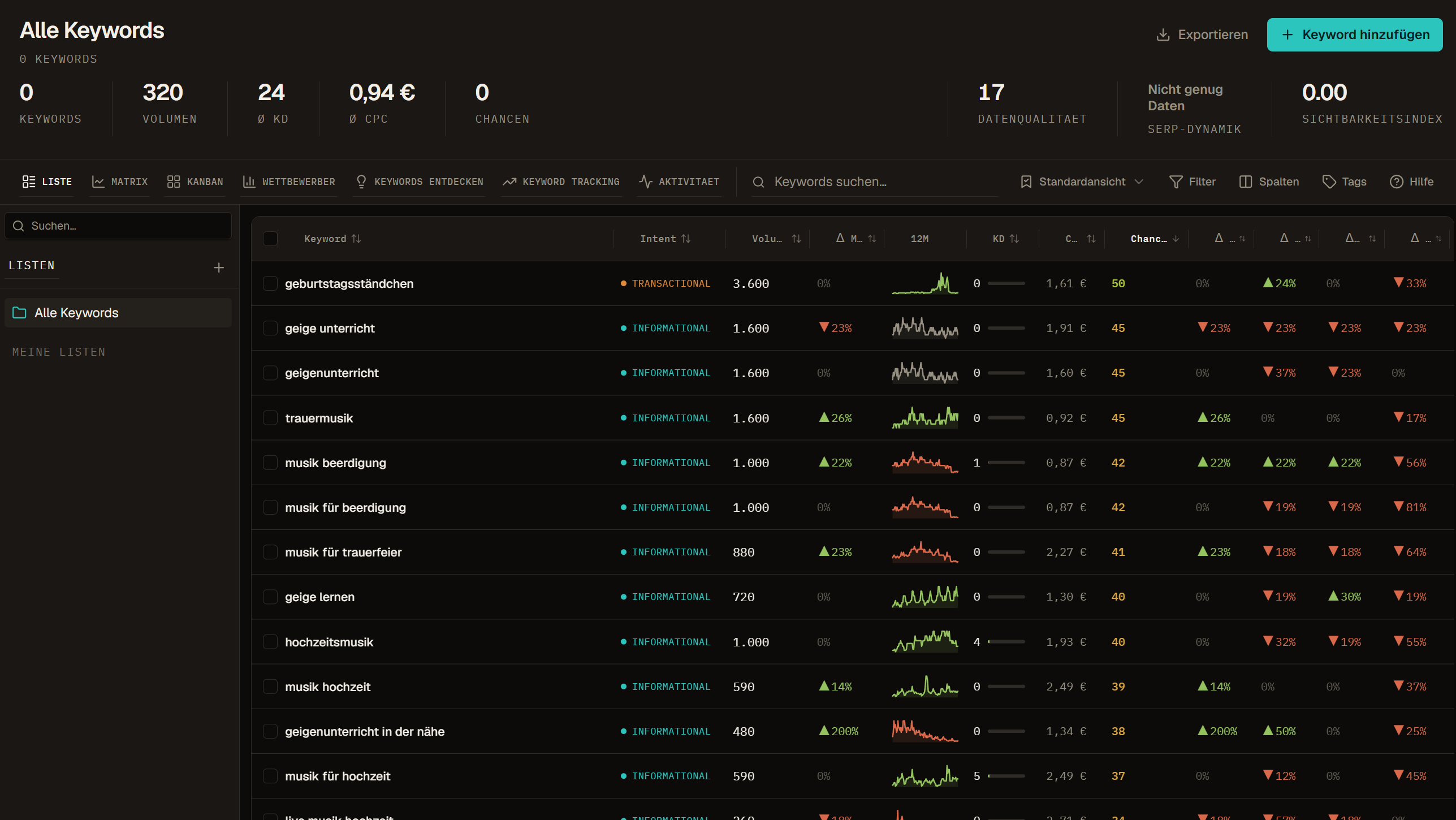
A clean keyword inventory
Keep imported, discovered, manually added, enriched, tracked, and exported keywords in one workspace instead of splitting them across disconnected sheets.
Decision-ready metrics
Read search volume, KD, CPC, Data Health, SERP Dynamics, Visibility Index, trends, and tracking positions together before choosing the next action.
Workflow, not storage
Lists, tags, presets, status fields, exports, tracking, and activity history turn keyword data into repeatable team work.
Recommended path through the docs
Keyword Database topics
| Topic | Use it for |
|---|---|
| Keywords, Lists, and Tags | Understand keyword rows, manual lists, smart lists, hybrid lists, and workspace tags. |
| Views | Choose the right work surface for review, prioritization, workflow, competitors, discovery, tracking, or activity auditing. |
| Filters, Presets, Columns, and Tags | Build repeatable keyword review setups and avoid exporting the wrong rows. |
| Metrics | Read Volume, KD, CPC, opportunities, Data Health, SERP Dynamics, Visibility Index, trends, and position fields correctly. |
| SERP, Competitors, and Tracking | Use rank snapshots, SERP features, competitor overlap, own-domain positions, and tracking history. |
| Import, Add Keywords, and Export | Add data, validate inputs, import larger files, and export the right scope. |
| Balance, Data Refreshes, and Paid Keyword Data | Understand when balance is used and how to scope paid keyword-data actions. |
Onboarding tour
The first-run tour highlights the most important controls directly in the UI: adding keywords, importing, exporting, searching, switching views, filtering, managing columns, saving presets, creating lists, reading the balance widget, and understanding the main KPI strip.
Users can skip the tour. After the first run, the Help button can replay it. Admin-only reset controls are for QA, training, and test accounts; they should not appear for normal non-admin users.
Add keywords
Use Add keyword for small manual batches and one-off ideas. Paste one keyword per line, keep inputs close to real search queries, and avoid mixing unrelated intent in the same batch. Larger files belong in the import workflow.
Import and export
Imports bring external keyword sets into the workspace. Exports write a chosen scope out for review, reporting, or work outside Contextter. The strongest exports start with a deliberate scope: the right list, filters, sort order, visible columns, and selection.