Keyword metrics explained
Metrics are signals for SEO decisions. No single number should decide a keyword alone. Read demand, difficulty, commercial value, data freshness, SERP movement, and own-domain visibility together.
Demand and value
Volume, CPC, bid range, ad cost, impressions, and intent help estimate whether a keyword can matter commercially.
Trust and freshness
Data Health, data date, source, language, and country show whether the row is reliable enough for the decision at hand.
SERP and position
SERP Dynamics, SERP features, backlinks, referring domains, top-10 strength, and rank history explain the actual search environment.
Keywords
The keyword count shows how many keyword rows are in the current scope. In the workspace view, it reflects the visible workspace keyword set. In a list, it reflects that list. With filters active, it reflects the filtered result set.
Use the count to understand scope before exporting, enriching, or tracking. A large count can mean the set is too broad for a single decision.
Volume
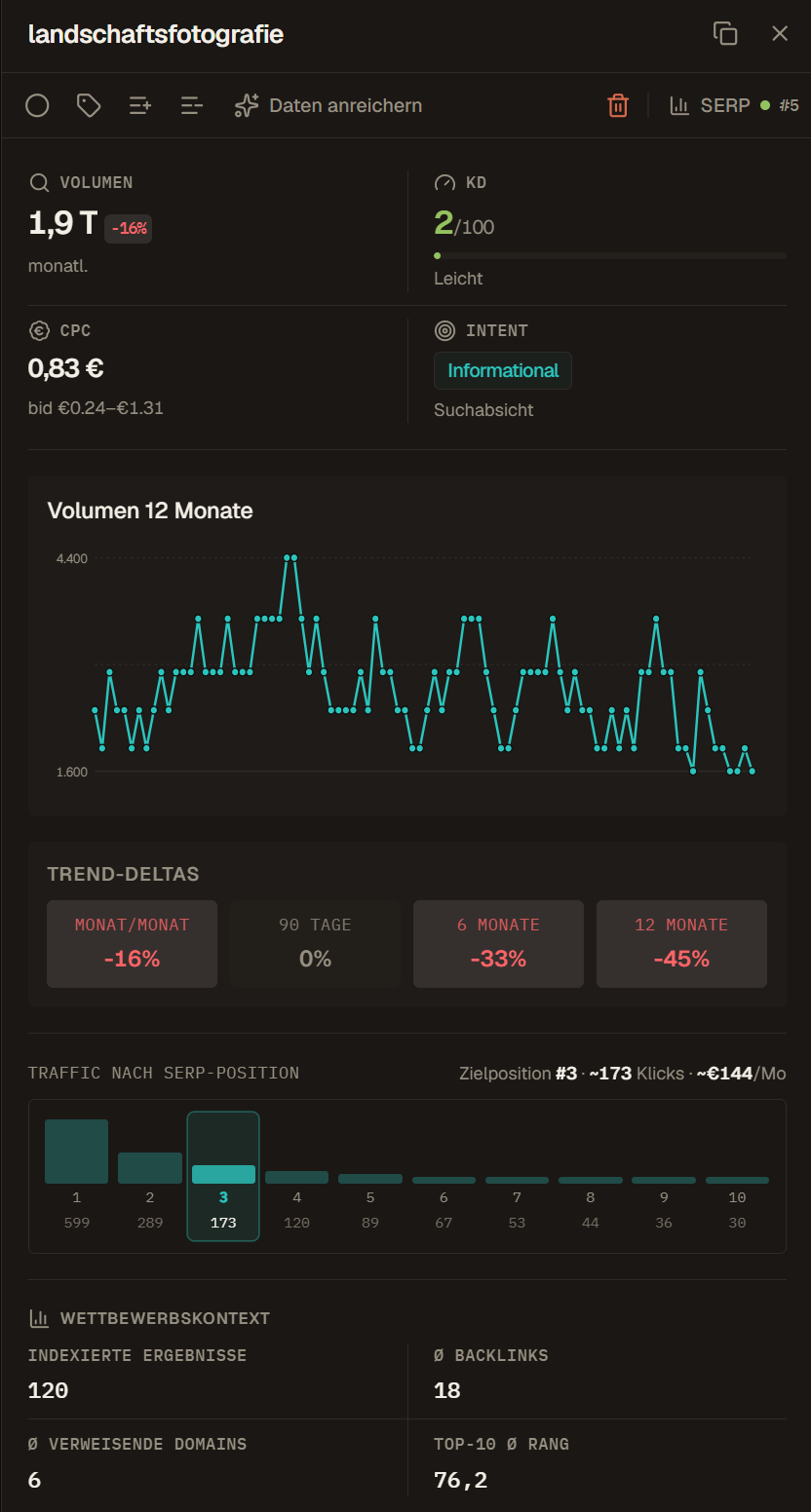
Volume is estimated monthly search demand for the selected market. Higher volume means more potential search demand, but it does not automatically mean better opportunity.
Use volume together with intent, KD, CPC, current ranking position, and SERP features. A low-volume term can still be valuable if it has strong buying intent or belongs to an important topic cluster. A high-volume term can be poor fit if the SERP expects a different page type than your team can produce.
KD
KD means Keyword Difficulty. It estimates how hard organic ranking may be, usually on a 0-100 scale. Lower KD often means an easier path, but the number is not a promise.
Read KD with SERP quality, own-domain authority, backlinks, referring domains, intent, and content fit. A low KD keyword with an irrelevant SERP can still be a bad target. A high KD keyword can still matter if it is strategically important or if your domain already ranks near page one.
CPC
CPC means Cost per Click. It estimates the average paid-search click price. High CPC often suggests advertiser demand or commercial value. It can also indicate a competitive market where organic content must be stronger and more specific.
Use CPC to identify keywords that may be valuable to sales, paid search, or commercial content. Do not use CPC alone as an SEO priority score.
Opportunities
Opportunities count keywords that look attractive by a simple heuristic, such as enough demand with manageable difficulty. Treat this as a shortlist signal, not as a final decision.
Before assigning work, check intent, SERP features, current rankings, content fit, and whether the keyword belongs in the right list or campaign.
Intent
Intent describes what the searcher likely wants: information, comparison, purchase, navigation, local action, or a mixed need. Intent should influence the page type, headline angle, CTA, internal links, and whether the keyword belongs in content, documentation, support, or product-led pages.
Common patterns:
- Informational: the user wants to learn
- Commercial: the user compares options
- Transactional: the user is close to action
- Navigational: the user wants a known brand, product, or destination
- Mixed: the SERP contains more than one likely user need
Month-over-month change
Month-over-month change compares recent demand with the previous month. Positive movement can reveal rising interest. Negative movement can signal seasonality, fading demand, or a temporary market shift.
Use this metric to decide whether a keyword needs fast review, but check longer trend fields before assuming a one-month movement is durable.
12-month sparkline
The sparkline shows a compact twelve-month search-volume pattern. It helps spot seasonality, spikes, durable growth, and declining topics without opening a separate report.
Use the sparkline before planning publication timing. Seasonal keywords often need content prepared before the demand peak.
Trend columns
Trend columns show movement over periods such as 30 days, 90 days, 6 months, or 12 months. They help separate temporary spikes from durable demand.
The "trending only" filter should be used as a discovery lens. It is good for finding momentum, but it can hide stable evergreen keywords that still matter.
Competition and competition index
Competition is a paid-ad competition signal. The competition index is the numeric form of that signal. It is useful for understanding advertiser pressure, but it is not the same as organic SEO difficulty.
Read competition with CPC and bid range for commercial pressure. Read KD, backlinks, referring domains, SERP features, and ranking positions for organic difficulty.
Bid range
Bid range estimates lower and upper top-of-page paid-search bids. It helps frame commercial demand and paid-channel pressure.
High bid ranges may suggest the keyword is valuable, but they can also mean organic content must compete with strong paid results above the fold.
SERP result count
SERP result count estimates how many indexed results are associated with the query. It can be a rough clue for market saturation, but it is weaker than reviewing the actual top results.
Use it as background context, not as a primary prioritization metric.
Average backlinks
Average backlinks summarizes backlink counts across the current top results. High averages can indicate a tougher organic environment, especially if the top-ranking pages are established and relevant.
Backlink counts can be noisy. Compare them with referring domains and the actual quality of ranking pages.
Average referring domains
Average referring domains counts distinct linking domains across top results. It is often a cleaner link-strength signal than raw backlink count because it reduces the effect of many links from the same domain.
Use it to estimate how strong the current ranking pages are, not to decide that a keyword is impossible.
Top-10 average rank
Top-10 average rank is a strength-style signal across the visible top results. Use it to understand whether strong domains dominate the SERP.
If the top 10 contains many strong domains, your content may need stronger authority signals, better topical depth, or a narrower angle.
Data Health
Data Health rates whether the row has enough fresh and complete data to support a decision. It combines keyword-data freshness, completeness, SERP freshness, tracking basis, and competitor context.
Low Data Health does not mean a keyword is bad. It means the row may not be trustworthy enough yet. Refresh data before making high-stakes decisions such as large exports, tracking setup, client reporting, or content prioritization.
SERP Dynamics
SERP Dynamics measures how much the top results move between snapshots. A stable SERP can be predictable but hard to disrupt. A volatile SERP can create opportunity, but it also adds uncertainty.
High SERP Dynamics should not be labeled as "easy". It means the market is moving. Review the SERP and decide whether the movement creates a realistic opening for your domain.
Visibility Index
Visibility Index summarizes estimated organic visibility from your own-domain page-one positions. In the KPI strip it is displayed as an index value. In table columns it may appear as estimated visibility clicks.
Use it to see where your domain already has traction. A list with rising visibility may be worth monitoring or expanding. A list with no visibility may still be valuable, but it needs a different plan: new content, stronger pages, or more realistic short-term goals.
Contextter's Visibility Index is scoped to the selected keyword set. Do not compare it directly with global visibility products unless the scope and calculation model are the same.
Position
Position is the current organic rank for the tracked domain. Unknown means the system has not fetched or cannot derive a current position for the selected keyword and market.
Position matters most when the tracked domain and target market are correct. Check those settings before acting on a missing or surprising rank.
Position change
Position change compares the current position with the previous saved point. An improvement means the rank number moved closer to 1. A decline means the rank moved away from 1 or disappeared from the tracked result set.
Always check whether the comparison period is meaningful. One noisy snapshot can look dramatic without representing a real trend.
Position trend
Position trend shows the recent shape of rank movement across stored snapshots. Use it to avoid overreacting to one position change.
Trend is especially useful after publishing or refreshing content because it helps separate early volatility from durable movement.
Historical position deltas
Historical position delta columns compare the current position with snapshots from around 3, 6, 9, or 12 months ago. They are useful for campaign retros, content decay checks, and long-term SEO reporting.
Use them to answer whether a keyword has improved, declined, or stayed stable across a meaningful period.
SERP features
SERP features show detected modules such as AI overviews, videos, images, People Also Ask, local packs, shopping results, or similar SERP elements.
SERP features can change expected click potential. A keyword with high volume but many attention-stealing features may have lower organic traffic potential than the volume suggests.
Categories
Categories are provider-supplied classifications when available. Treat them as supporting metadata, not as a replacement for your own lists and tags.
Use categories for rough grouping or audits, but use team-defined tags when the label affects workflow.
Language and country
Language and country describe the search market used for keyword data. Volume, CPC, SERP, intent, and ranking positions can change significantly by market.
Compare keywords only when their markets are compatible. If a list mixes markets, add columns or filters so the team can see that before acting.
Ad cost
Ad cost estimates paid traffic cost for a keyword. Use it as a commercial signal and to compare paid-channel pressure with organic opportunity.
High ad cost can support prioritization when the keyword also fits intent, content strategy, and organic feasibility.
Ad impressions
Ad impressions estimate paid-search impression potential. They are useful when comparing SEO opportunity with paid campaign context.
Use them with CPC, bid range, and intent to understand commercial pressure.
Status
Status is the workflow state used by Kanban and list workflows. Common states include backlog, research, in progress, published, tracking, and archived.
Status should represent a real team decision. Do not use it as a vague label when a tag would be clearer.
Source
Source shows where the keyword came from, such as manual entry, import, discovery, research, or a data provider.
Use source when auditing data quality, understanding how a keyword entered the workspace, or investigating unexpected rows.
First seen
First seen is the first time the keyword appeared in the workspace. It helps separate older backlog ideas from newly discovered opportunities.
Use it for cleanup, backlog review, and understanding whether a keyword is new enough to deserve attention.
Data date
Data date shows when the latest keyword data snapshot was fetched. If the date is old, refresh before making high-stakes prioritization decisions.
Old data is not always useless, but the risk increases when markets move, seasonality matters, or the decision affects budget, reporting, or campaign timing.